 Pete Freitag
Mastering ColdFusion's CFQUERYPARAM
By Pete Freitag

If you haven't been using the cfqueryparam tag, chances are you have learned about it the hard way. As you may have heard, lots of ColdFusion powered sites were heavily targeted by hackers using SQL Injection this week.
Fortunately SQL Injection is very easy to prevent in CFML using the cfqueryparam tag. There are however a few cases where you can't use the cfqueryparam tag. In those cases, ColdFusion might throw an exception that looks like this:
[Macromedia][SQLServer JDBC Driver][SQLServer]Incorrect syntax near '@P1'.
[Macromedia][SQLServer JDBC Driver][SQLServer]Statement(s) could not be prepared.
Let's take a look at some of these special cases, and how to get around them:
SELECT TOP
If you are passing a variable into a SELECT TOP statement, you can't use cfqueryparam, instead consider using the Val function. This is a really handy function that will return 0 whenever it gets a non-numeric value. The Val function still allows decimal values, we can convert those to an integer using the Ceiling function, which rounds up to the nearest integer.
SELECT TOP #Ceiling(Val(url.max_rows))# first_name FROM people
ORDER BY
When attempting to use a cfqueryparam tag in the ORDER BY statement you might receive an error such as:
[Macromedia][SQLServer JDBC Driver][SQLServer]The SELECT item identified
by the ORDER BY number 1 contains a variable as part of the expression
identifying a column position. Variables are only allowed when ordering
by an expression referencing a column name.
A good way to get around this limitation is to use the ListFindNoCase function, to limit the sortable column names, for example:
<cfset sortable_column_list = "age,height,weight,first_name">
<cfquery name="people">
    SELECT first_name, age, height, weight
    FROM people
    ORDER BY
    <cfif ListFindNoCase(sortable_column_list, url.sort_column)>
        #url.sort_column#
    <cfelse>
        first_name
    </cfif>
</cfquery>
While the above code would be safe, something about it doesn't smell right to me. Yes having pounds in the query without a cfqueryparam is a code smell to many. So I prefer to explicitly list out the cases using a switch case statement:
<cfquery name="people">
    SELECT first_name, age, height, weight
    FROM people
    ORDER BY
    <cfswitch expression="#url.sort_column#">
        <cfcase value="age">
            age
        </cfcase>
        <cfcase value="height">
            height
        </cfcase>
        <cfcase value="weight">
            weight
        </cfcase>
        <cfdefaultcase>
            first_name
        </cfdefaultcase>
    </cfswitch>
</cfquery>
Using cfqueryparam with lists
What to do when your variable contains a list of values to be used with a SQL IN expression? The cfqueryparam actually makes it very easy to pass a list, you don't even need to put single quotes around each element if for text lists, it takes care of that for you. To use cfqueryparam for a list with an IN simply add list="true" to your cfqueryparam tag.
<cfset name_list = "Bob,Fred,Pete">
<cfquery ...>
  SELECT first_name, age, height, weight
  FROM people
  WHERE first_name IN (<cfqueryparam value="#name_list#" list="true" cfsqltype="cf_sql_varchar">)
</cfquery>
Cached Queries with cfqueryparam
As of ColdFusion 8 and above cfqueryparam works with cached queries. If you are running earlier versions, you won't be able to use cfqueryparam with cached queries.
If the variables passed into the query are integer only, then you can use the Val function to protect against SQL Injection. Or if the possible string values are limited you can use the ListFindNoCase function as shown above.
The best workaround is to remove the caching, upgrade to CF8, or cache them in the application scope, as follows:
<cfif NOT IsDefined("application.my_cached_query")>
  <cfquery name="application.my_cached_query">
    ...
  </cfquery>
</cfif>
This will keep the query cached until the application is reinitialized, or the variable is overwritten.
Passing NULL's
The cfqueryparam tag lets you pass null values into your database using the null="true" attribute. For example:
UPDATE people
SET age = <cfif IsValid("integer", form.age) AND form.age NEQ 0>
  <cfqueryparam value="#form.age#" cfsqltype="cf_sql_integer">
<cfelse>
  <cfqueryparam null="true" cfsqltype="cf_sql_integer">
</cfif>
The above can also be simplified like this:
UPDATE people
SET age = <cfqueryparam value="#form.age#" cfsqltype="integer" null="#isNumeric(form.age)#">
Finding and Fixing missing cfqueryparam's
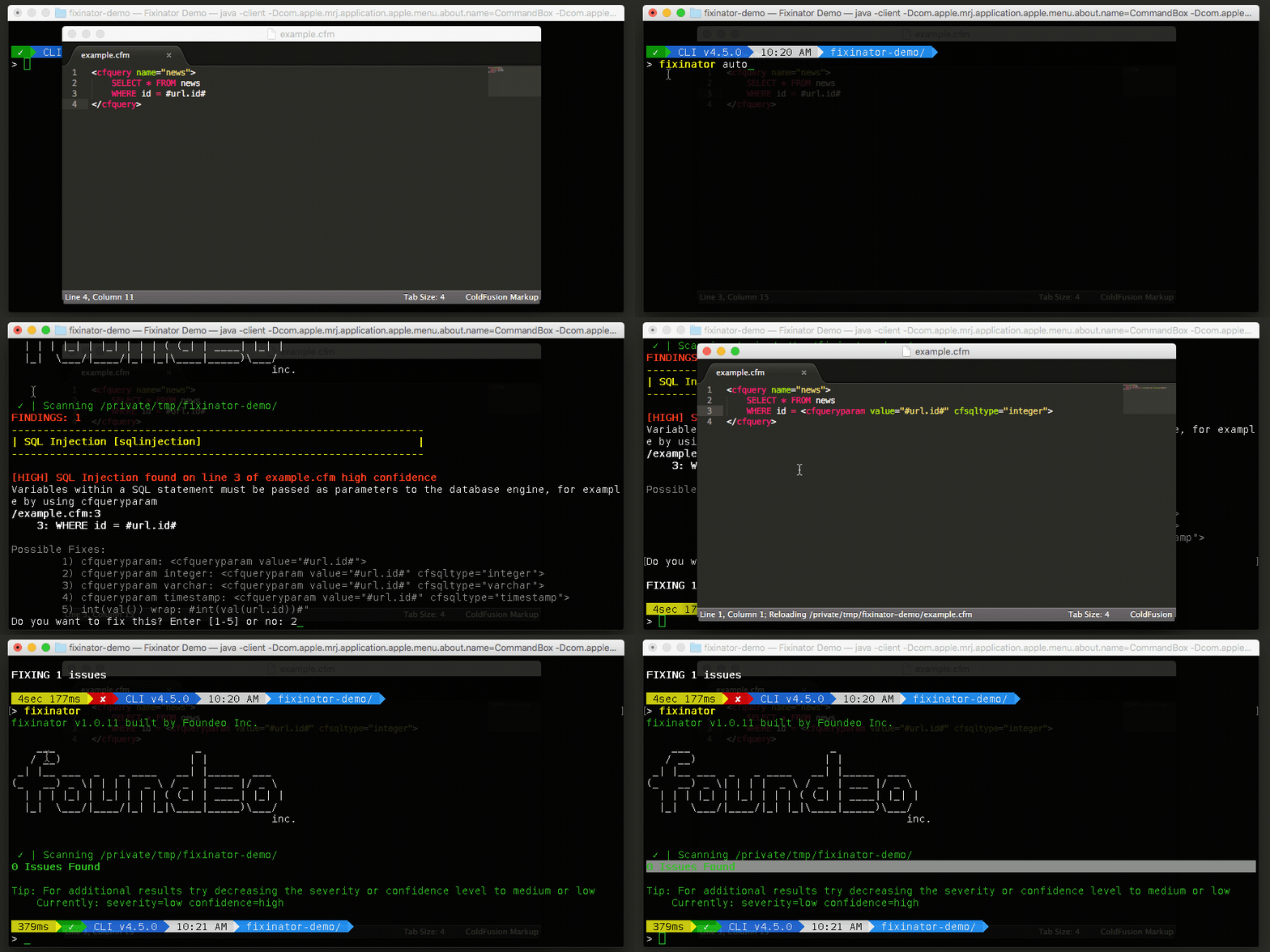
Finding and fixing missing cfqueryparam's or or rather code that is vulnerable to SQL Injection can be a tedious task. Fortunately, there are tools which can make this more bearable. My company makes a tool called Fixinator which can scan your code to locate code that is vulnerable to SQL Injection. Fixinator can even auto fix them if you want to speed up the process.
Other tips
You might find it useful to learn that the cfsqltype attribute is optional, and as of ColdFusion 11 and up the cf_sql_ prefix is optional on the cfsqltype attribute values. So instead of typing cf_sql_integer you can just use integer now.
Those are some of the more common gotcha's that you will run into with cfqueryparam. Please post a comment with any other cfqueryparam tricks, or special cases.
Mastering ColdFusion's CFQUERYPARAM was first published on July 24, 2008.
If you like reading about cfqueryparam, cfml, coldfusion, security, sql injection, sql, or cfquery then you might also like:
- Fixinator and Foundeo Security Bundle
- CFSummit 2016 Slides
- Scope Injection in CFML
- Client Variable Cookie CFGLOBALS Includes Session Ids
The Fixinator Code Security Scanner for ColdFusion & CFML is an easy to use security tool that every CF developer can use. It can also easily integrate into CI for automatic scanning on every commit.
Try Fixinator
CFBreak
The weekly newsletter for the CFML Community
Comments
I've also begun adding Val() to my CFQueryParam's. I.e., <cfqueryparam value="#val(form.age)#" cfsqltype="cf_sql_integer">
Of course you can/should also validate your data before getting to the query.
UPDATE people
SET age = <cfqueryparam value="#form.age#" null="#not IsValid("integer", form.age) OR form.age EQ 0)#" cfsqltype="cf_sql_integer" />
If the expression evaluates to TRUE, the null overrides the value.
select *
from products
order by
<cfswitch expression="#url.sortby#">
<cfcase value="pname">
product_name
</cfcase>
<cfcase value="price">
retail_price
</cfcase>
</cfswitch>
By doing this your not exposing table or column names to the world. The lesson is to limit your exposure.
Wil Genovese
Sr. Web Application Developer