 Pete Freitag
Simple Flex Tutorial
By Pete Freitag

I've been learning Flex for a presentation at my local CFUG, and I'm actually quite impressed with how much you can do with so little code.
However, most of the Flex tutorials I have found are very long and over simplified, so I've created a simple blog reader in 23 lines of MXML code to use as a tutorial. Here's what our Flex Application will look like:
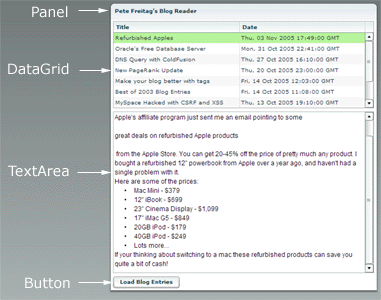
How does the example work?
When you click the Load Blog Entries button my RSS feed entries are loaded into the datagrid. When you click on a row in the datagrid the corresponding entry is loaded into the text area.
Step 1 - XML and Application declaration
Start your XML file with a XML declaration, and an mx:Application tag:
<?xml version="1.0" ?>

<mx:Application xmlns:mx="http://www.macromedia.com/2003/mxml">
Step 2 - Define your HTTPService
Our first step is to define the HTTPService that we will use to connect to my RSS feed. We will give an id of httpRSS so we can refer back to it.
<mx:HTTPService id="httpRSS" url="https://www.petefreitag.com/rss/" resultFormat="object" />
Step 3 - Enclose your controls within a panel
A panel is simply a container to put controls (the DataGrid, TextArea, and Button) into. We are going to set some attributes on the panel as well, it should be pretty easy to figure out what they mean:
<mx:Panel id="reader" title="Pete Freitag's Blog Reader" width="500">
Step 4 - Define your DataGrid
We are using the DataGrid component to display the list of blog entries in my RSS feed, along with their date.
This step is probably the most complicated step because we have to bind our RSS xml data to the datagrid, and define an event handler when the rows are clicked.
In the attributes of the DataGrid we are using dynamic variables or expressions denoted by the curly braces {variable}.
<mx:DataGrid id="entries" width="{reader.width-15}" dataProvider="{httpRSS.result.rss.channel.item}" cellPress="{body.htmlText=httpRSS.result.rss.channel.item[entries.selectedIndex].description}">
  <mx:columns>
    <mx:Array>
      <mx:DataGridColumn columnName="title" headerText="Title" />
      <mx:DataGridColumn columnName="pubDate" headerText="Date" />
    </mx:Array>
  </mx:columns>
</mx:DataGrid>
Ok so there is a lot going on there, first so I'll break it down a bit:
width
We are setting the width dynamically based on the size of its parent panel reader, specifically we set it to be 15 pixels narrower than its panel.
dataProvider
In the dataProvider attribute we are binding the data for this grid to the result of our HTTPService named httpRSS. More specifically we want to bind each item tag in our XML file to a row in the datagrid. Since the item tags are inside the rss and channel tags we refer to it the array of items as httpRSS.result.rss.channel.item.
cellPress
Next we want to create an event handler that will display the contents of the description tag inside the item that is clicked on. Using the variable entries.selectedIndex we know which item was clicked on, and we can refer to the description (the entry body) of that item as: httpRSS.result.rss.channel.item[entries.selectedIndex].description.
Now we just need to set the value of our TextArea which we will define in the next step to the rss item description, so we simply assign that value to the htmlText property of the TextArea (whose name will be body).
columns
Now we need to define which columns we are to display in the datagrid. The columnName must match the tag name that we want it to correspond to.
Step 5 - Define the TextArea
Use the mx:TextArea tag to define the text area where the entry body will go:
<mx:TextArea id="body" editable="false" width="{reader.width-15}" height="300" />
Step 6 - Create a Button
Our last control to define is a Button which will simply tell the HTTPService to make the request.
<mx:Button label="Load Blog Entries" click="{httpRSS.send()}" />
In the click event handler we call the send() method on our HTTPService object.
Step 7 - Close Panel and Application
Simply close some tags, and your done!
</mx:Panel>
</mx:Application>
One Caveat
Flex 1.5 uses a proxy to invoke HTTPService calls, and other remote service calls, and for security reasons the proxy will block the HTTP call. You add the RSS feed url (or simply http://*) to the proxy whitelist in your flex-config.xml. See this KB article 19251 for more info.
Complete MXML source code:
<?xml version="1.0" ?>

<mx:Application xmlns:mx="http://www.macromedia.com/2003/mxml">

 <mx:HTTPService id="httpRSS" url="https://www.petefreitag.com/rss/" resultFormat="object" />

 <mx:Panel id="reader" title="Pete Freitag's Blog Reader" width="500">

  <mx:DataGrid id="entries" width="{reader.width-15}" dataProvider="{httpRSS.result.rss.channel.item}" cellPress="{body.htmlText=httpRSS.result.rss.channel.item[entries.selectedIndex].description}">
    <mx:columns>
      <mx:Array>
        <mx:DataGridColumn columnName="title" headerText="Title" />
        <mx:DataGridColumn columnName="pubDate" headerText="Date" />
      </mx:Array>
    </mx:columns>
  </mx:DataGrid>

  <mx:TextArea id="body" editable="false" width="{reader.width-15}" height="300" />

  <mx:Button label="Load Blog Entries" click="{httpRSS.send()}" />

 </mx:Panel>
</mx:Application>
Simple Flex Tutorial was first published on November 07, 2005.
If you like reading about flex, mxml, tutorial, rss, or xml then you might also like:
- Foundeo's 2007 End of the Year Sale
- Apple still likes their RSS icon
- AJAX Tutorial with Prototype
- Simple Flex Example
Discuss / Follow me on Twitter ↯
Tweet Follow @pfreitagComments
1) Modify the namespace URL as suggested above.
2) Change the two places where "{reader.width-15}" occurs to "100%", as the data binding expressions cause unwanted scrollbars to appear in the alpha.
"TypeError: Error #1010: undefined has no properties.
at Peter/__entries_cellPress()
at flash.events::EventDispatcher/dispatchEvent()
at mx.core::UIComponent/dispatchReplayableInteraction()
at mx.controls::DataGrid/mouseDownHandler()
"
After that It will work,strange..
Design mode: Error updating attributes for item DataGrid "entries".
Cannot resolve attribute 'columnName' for component type mx.controls.dataGridClasses.DataGridColumn.
Cannot resolve attribute 'columnName' for component type mx.controls.dataGridClasses.DataGridColumn.
Cannot resolve attribute 'cellPress' for component type mx.controls.DataGrid.
Does anyone know how to fix these problems?
grtz
<?xml version="1.0" encoding="utf-8"?>
<mx:Application xmlns:mx="http://www.adobe.com/2006/mxml" layout="absolute" width="100%" height="100%">
<mx:HTTPService id="RSSfeed" url="http://www.petefreitag.com/rss/" resultFormat="object" />
<mx:Panel width="372" height="330" layout="absolute" horizontalCenter="0" verticalCenter="-37.5" title="XML lezen">
<mx:DataGrid x="28" y="10" width="296" id="entries" dataProvider="{RSSfeed.result.rss.channel.item}" click="{body.htmlText=RSSfeed.result.rss.channel.item[entries.selectedIndex].description}">
<mx:columns>
<mx:DataGridColumn dataField="title" headerText="Titel"/>
<mx:DataGridColumn dataField="pubDate" headerText="Datum"/>
</mx:columns>
</mx:DataGrid>
<mx:TextArea x="28" y="160" width="296" height="90" id="body" />
<mx:Button x="143" y="258" label="Check" click="{RSSfeed.send()}"/>
</mx:Panel>
</mx:Application>
Can anyone help me? Thnx in advance!
aka flex newb
Could you put up some more interesting examples? I found this similar exercise in the Adobe tutorials too.
I have a problem in flex and hope that you or anybody else can help us.
I have a problem with the MenuBar and a question to delete a component out of storage.
1. We have implemented the MenuBar, which was filled dynamically with XML data.
Sporadically it will appear following fault, if we "mousover" the root layer.
RangeError: Error #2006: Der angegebene Index liegt außerhalb des zulässigen Bereichs.
at flash.display::DisplayObjectContainer/addChildAt()
at mx.managers::SystemManager/http://www.adobe.com/2006/flex/mx/internal::rawChildren_addChildAt()
at mx.managers::SystemManager/addChild()
at mx.managers::PopUpManager$/addPopUp()
at mx.controls::Menu/show()
at mx.controls::MenuBar/::showMenu()
at mx.controls::MenuBar/::mouseOverHandler()
Here a abrid ged version of our XML to create the MenuBar:
<Menuebar>
...
<menu label="Artikel">
<menu label="Artikel anlegen" data="new_article" />
<menu label="Artikel bearbeiten" data="edit_article" />
<menu label="Verpackung">
<menu label="Verpackung anlegen" data="new_package" />
<menu label="Verpackung bearbeiten" data="edit_package" />
</menu>
<menu label="Materialgruppe">
<menu label="Materialgruppe anlegen" data="new_materialgroup" />
<menu label="Materialgruppe bearbeiten" data="edit_materialgroup" />
</menu>
</menu>
...
</Menuebar>
It is a well-formed XML.
2. Delete a component out of storage
We have some own components (basically forms), which will be created and shown by an construct e.g.
var myComponent : T_Component = new T_Component ;
this.addChild(myComponent)
Some of our forms will be created in an popup. On every call of the popup, we lost 5 mb or more, all childs on the windows will be removed by formname.removeAllChild();
What cann we do, that the garbage collector will dispose this objects.
Is there a way to show all objects with references (NOT NULL)?
I have read in the Flex Help, that this.removeChild(myComponent) not delete the form and/or object out of the storage.
Rather the object must be destroyed.
It is sufficient to call delete(myComponent) about remove this object out of the storage as the case may be that the garbage-collector remove this object at any time?
Or how can I destroy a component correctly. What happens with the widgets on this component e.g. input fields or datagrids?
Are they also being deleted?
Thanks for your help.
Matze
plz can u let me know about flex?
can you put something like a localhost in the parameters of httpservice?
pls tell me
I hae two weeks to build out a report module to a Flex 2.0 project using ColdFusion and MSSQL as a backend.
Up until now, I've only worked with PHP and Rails (both using MySQL).
The report is a little intense, but it is in a spreadsheet format. Are there any recommendations in terms of tutorials on built-in report features in Flex 2.0 as well as export functionality to different office/adobe document formats?
I had tried that above example and made changes as Click and DataField too. But still I am getting this error "1119: Access of possibly undefined property result through a reference with static type mx.rpc.http.mxml:HTTPService. testing/src testing.mxml"
Pls anyone can explain me...
On 10/11/2007 at 8:41:55 AM MDT ibitus wrote:
38 Hi Pete, thank you for this nice Reader!
Some RSS-Feeds are working fine and some bring the Error-Message: [RPC Fault faultString="Security error accessing url" faultCode="Channel.Security.Error" faultDetail="Destination: DefaultHTTP"] at mx.rpc::AbstractInvoker/http://www.adobe.com/2006/flex/mx/internal::faultHandler() at mx.rpc::Responder/fault() at mx.rpc::AsyncRequest/fault() at ::DirectHTTPMessageResponder/securityErrorHandler() at flash.events::EventDispatcher/flash.events:EventDispatcher::dispatchEventFunction() at flash.events::EventDispatcher/dispatchEvent() at flash.net::URLLoader/flash.net:URLLoader::redirectEvent()
What is going wrong ?
---------------------------
I am also getting the same error.
My file runs fine when i run from Flex. but when i copy the folder to another location, it gives me this error.
Any solutions??
I know absolutely nothing about Flex, yet I got this app working in about 30 minutes after reading the whole thing through once. The changes in the comments are necessary for Flex Builder 3.0 as well, just FYI.
Thanks!
It run successfully in Flex 3 here's the edited code:
<?xml version="1.0" encoding="utf-8"?>
<mx:Application xmlns:mx="http://www.adobe.com/2006/mxml">
<mx:HTTPService id="httpRSS" url="http://www.petefreitag.com/rss/" resultFormat="object"/>
<mx:Panel id="reader" title="Pete Freitag's Blog Reader" width="500">
<mx:DataGrid id="entries" width="100%" dataProvider="{httpRSS.lastResult.rss.channel.item}" itemClick="{body.htmlText=httpRSS.lastResult.rss.channel.item[entries.selectedIndex].description}">
<mx:columns>
<mx:Array>
<mx:DataGridColumn dataField="title" headerText="Title" />
<mx:DataGridColumn dataField="pubDate" headerText="Date" />
</mx:Array>
</mx:columns>
</mx:DataGrid>
<mx:TextArea id="body" editable="false" width="100%" height="300"/>
<mx:Button label="Load Blog Entries" click="{httpRSS.send()}" />
</mx:Panel>
</mx:Application>
thanks
areef
thanks
areef
First of all thanks for such a wonderful blog.
I am using your technique to display the contents in a text area when an entry is clicked in a DataGrid.
This what I use in DataGrid:
click="{body.htmlText=service.lastResult.report.recs[entries.selectedIndex].detail}"
This works fine except for the case when the grid has just one entry. In this case when I click on the entry it gives an error:
TypeError: Error #1010: A term is undefined and has no properties.
Can you please guide with this one,
Thanks,
Chintan
<mx:Application xmlns:mx="http://www.adobe.com/2006/mxml" layout="absolute" creationComplete="{httpRSS.send()}" >
<mx:HTTPService id="httpRSS" url="your_site_name_here" />
Completed code with auto load
<mx:Panel id="reader" title="Pete Freitag's Blog Reader" width="500">
<mx:DataGrid id="entries" width="{reader.width-15}" dataProvider="{httpRSS.lastResult.rss.channel.item}"> <mx:columns> <mx:Array> <mx:DataGridColumn dataField="title" headerText="Title" /> <mx:DataGridColumn dataField="pubDate" headerText="Date" /> </mx:Array> </mx:columns> </mx:DataGrid>
<mx:TextArea id="body" editable="false" width="{reader.width-15}" height="300" htmlText="{entries.selectedItem.description}" />
</mx:Panel>
</mx:Application>
Thanks so much in advance!
I am new to Flex, in my application, i need help of learning materials, creating sample coding,how to linking internet application through source code.
Truely platform independent, supported on various hardware and operating systems and truely working everywhere great.
Open Source makes it really easy to understand and extend the functionality.
Every control/component can be extended and there are less restrictions overriding default behaviour.
The most easy way to create new components, you can have mxml derive from any control and extend them with extensive binding
Flex contains lots of controls and you dont need any third party library
Thankx
i have to populate my datagrid with the arraylist which is returned by my jaava code. i tried all the means but no progress. am returning an arraylist as
<b>
while(rs.next())
{System.out.println("hai stupid");
B.add(rs.getInt("Ticket_ID"));
C.add(rs.getString("MODIFIED_ON"));
D.add(rs.getString("SEVERITY"));
E.add(rs.getString("E_MAIL"));
F.add(rs.getString("IP"));
System.out.println("hai ");
abc.add(0,B);
abc.add(1,C);
abc.add(2,D);
abc.add(3,E);
abc.add(4,F);
}
</b>
on the other hand in my flex prg am calling<b>
[Bindable]
public var dp:ArrayCollection;
</b>
.
.
.
.
in result handler <b>
dp = (event.result as ArrayCollection);
</b>
where dp is my dataprovider.
plz give me a solution how i shud populate my datagrid.
regards
asha
i have to populate my datagrid with the arraylist which is returned by my jaava code. i tried all the means but no progress. am returning an arraylist as
<b>
while(rs.next())
{System.out.println("hai stupid");
B.add(rs.getInt("Ticket_ID"));
C.add(rs.getString("MODIFIED_ON"));
D.add(rs.getString("SEVERITY"));
E.add(rs.getString("E_MAIL"));
F.add(rs.getString("IP"));
System.out.println("hai ");
abc.add(0,B);
abc.add(1,C);
abc.add(2,D);
abc.add(3,E);
abc.add(4,F);
}
</b>
on the other hand in my flex prg am calling<b>
[Bindable]
public var dp:ArrayCollection;
</b>
.
.
.
.
in result handler <b>
dp = (event.result as ArrayCollection);
</b>
where dp is my dataprovider.
plz give me a solution how i shud populate my datagrid.
regards
asha
plz can u let me know about flex?
& vedio tutorials also
i want to learn adobe flex .now any body knows to mostly use ful tutorial adobe flex pl z ...
<mx:Application xmlns:mx="http://www.macromedia.com/2003/mxml">
I think it should read:
<mx:Application xmlns:mx="http://www.macromedia.com/2005/mxml">