 Pete Freitag
Virtual Desktop Manager for Windows XP
By Pete Freitag

The other day I blogged about a virtual desktop manager for Mac OS X - if your interested in getting one for Windows XP, you can get one from Microsoft's PowerToys download page. To enable it right click on your taskbar, goto the Toolbars menu, and select Desktop Manager.

I found the program to be a bit clunky (of course I already have two monitors hooked up, so I don't really need it on my XP computer), I have used a virtual desktop manager on windows in the past that came with my video card, and it had much better performance.
There are also other handy tools such as the ClearType tuner. If you have not enabled ClearType on your computer, your eyes will thank you once you do!
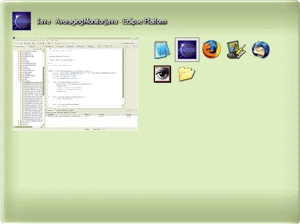
There is an Alt-Tab replacement that shows screen shots of your running applications. I don't really like this one though because it wastes a lot of space (this is resized to smaller than actual size):
A tool that lets you resize an image, or images when you right click on them.
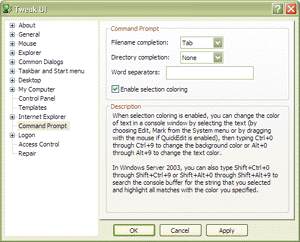
The Tweak UI tool, is also pretty handy - it lets you set lots of UI options for Windows, IE, Desktop, etc. For instance you can tweak how quickly a mouseover hover is recognized. You can configure which programs are allowed to show up in the recent applications list in your start menu. You can also change the location of My Documents, My Music, etc.
Virtual Desktop Manager for Windows XP was first published on February 22, 2005.
Discuss / Follow me on Twitter ↯
Tweet Follow @pfreitagComments
The WinXP one, I only used it a short time when I was still using Windows as the OS of my fist choice. And it performed rather bad than anything else. It was no pleasure to use it. I quickly stopped using it.
With Dexpot I can do the following
1. Create up to 20 virtual desktops. Most virtual desktop managers in windows only allow you to create 4 virtual desktops.
2. Use it on a flash drive. The program does not need admin rights to run.
3. Get a full screen preview of all the virtual desktops in use
4 Use all the features of Mac expose in Windows.
5. Move windows from one desktop to the other using the keyboard and mouse. Most virtual desktop managers for windows failed to move the command prompt. In Dexpot you can only the command prompt by keyboard shortcut.
6. Name each desktop.
7. Give each desktop a different set of desktop icons and background images.
8. Set applications to open on a specific desktop.
9. Change keyboard shortcuts for the indiviual functions of the application.
10 The user is able to escape the application if you need to. Example keyboard shortcut conflick beween Dexpot and another program. The program will move all application windows to the current desktop. This helps to prevent lost application windows when the program closes.
unfortunately it costs money, but if you really like it its worth it I would say.