 Pete Freitag
IIS: Disabling Weak SSL Protocols and Ciphers
By Pete Freitag

It's no secret by now that if your web site sees credit card numbers (even if they are passed to a third party gateway) you need to comply with the PCI DSS standards.
Requirement 4.1 states:
Use strong cryptography and security protocols such as SSL/TLS or IPSEC to safeguard sensitive cardholder data during transmission over open, public networks.
If you are running IIS there are typically several weak Protocols and Ciphers enabled, such as SSLv2, and 40-56 bit key ciphers. The Internet Information Services Management Console doesn't have a GUI to let you disable these protocols and ciphers. You need to use Regedit to make several registry changes in order to disable these.
While doing some consulting work last week a client mentioned how useful it would be to have a product for toggling ciphers and protocols in IIS. I agreed, and built the following:
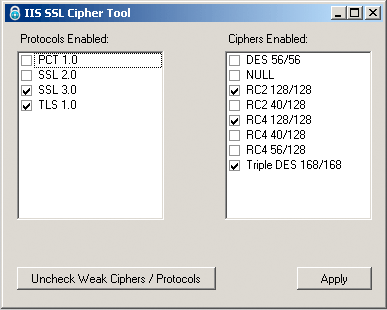
I also built a web based tool to test your server for SSLv2. The testing tool works on both IIS and Apache Web servers. The testing tool is no longer online, but there are many sites or tools that let you do this today.
IIS: Disabling Weak SSL Protocols and Ciphers was first published on October 08, 2009.
If you like reading about iis, ssl, ciphers, protocols, cryptography, windows, security, config, or utilities then you might also like:
- Request Filtering in IIS
- Howto Disable the Server Header in IIS
- Remove the Server Header in any IIS Version
- Self Signed Certificates in Edge on Windows 2022
Weekly Security Advisories Email
Advisory Week is a new weekly email containing security advisories published by major software vendors (Adobe, Apple, Microsoft, etc).